
In this lesson you will
- Understand why payments wait in Undeposited Funds
- Group several payments into one deposit
- Take off a card processor's fee
- Print a deposit slip
Before you start
Why Undeposited Funds
Step 1: One deposit, one bank line
If you take three checks to the bank together, the bank shows one deposit. Receive Payment and Sales Receipts put money in Undeposited Funds by default, and Make Deposit moves the ones you took to the bank in one go. That makes reconciling the bank account much easier.
Make the deposit
Step 2: Tick what is going to the bank
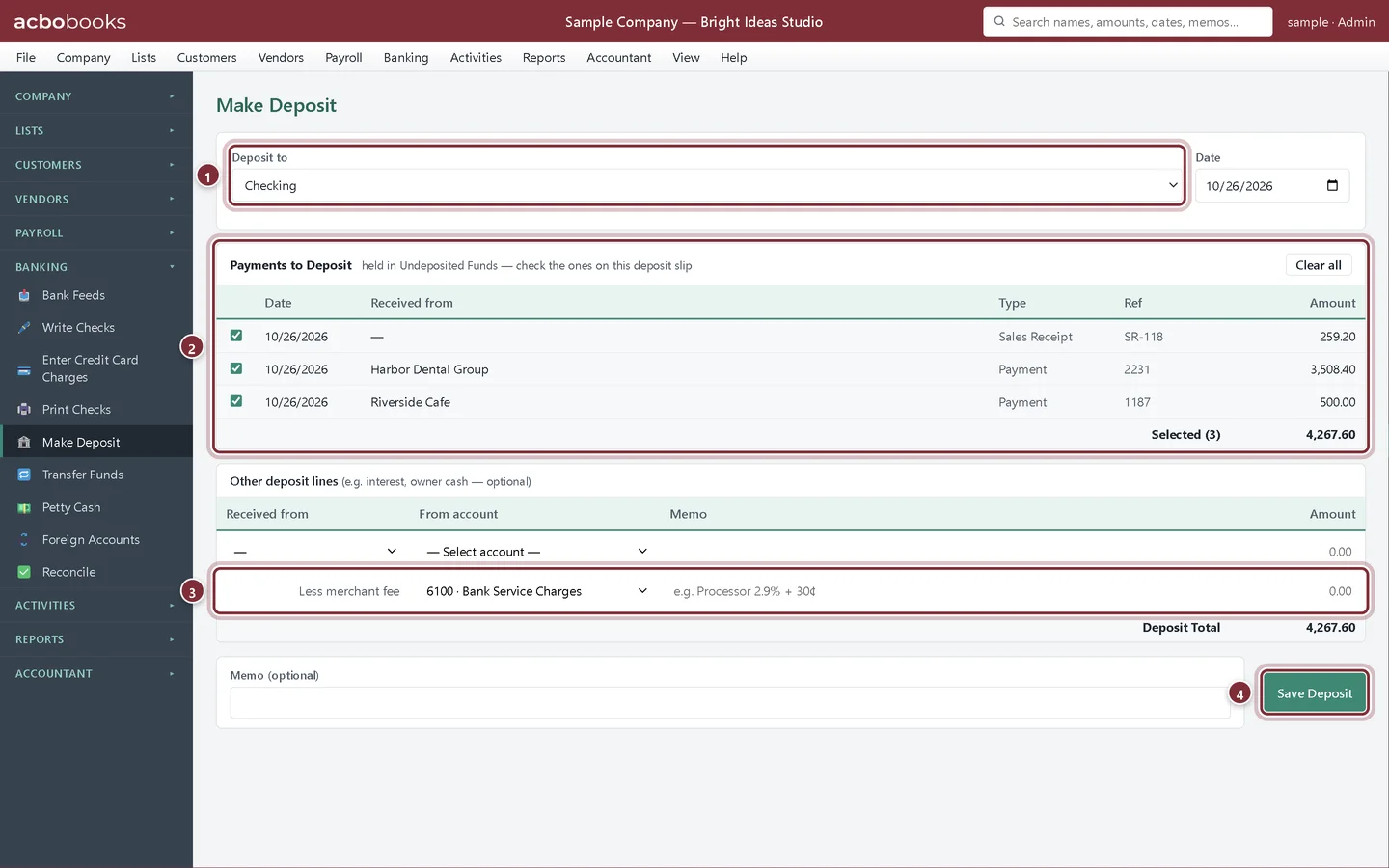
Choose Banking → Make Deposit. Pick the bank account in Deposit to and the date. Under Payments to Deposit, tick the payments and receipts on this deposit slip; Select all ticks them all. The selected total shows underneath.
- Deposit to: the bank account.
- Payments to Deposit: everything waiting in Undeposited Funds.
- Less merchant fee: a card processor's fee taken out before the money arrives.
- Save Deposit.
Step 3: Save and print the slip
Click Save Deposit. AcboBooks confirms the amount and offers Print deposit slip, a PDF listing every item on the deposit.
- Print deposit slip.

Recap
- Explain what Undeposited Funds is for.
- Group payments and receipts into one bank deposit.
- Record a merchant fee so the deposit matches the statement.
- Print a deposit slip.
Questions
A payment I recorded doesn't show on Make Deposit.
It was probably saved straight to a bank account. Only payments saved to Undeposited Funds appear under Payments to Deposit.
My card processor paid out less than the sales.
Tick the payments, then enter the fee on the Less merchant fee line with the fee expense account. The deposit then shows the net amount that reached the bank.
Where can I see past deposits?
Reports → Deposit Detail lists each deposit and what was in it.
Related
Screenshots from AcboBooks 0.2.2 with the built-in sample company. Updated October 25, 2026. Your screens may differ slightly with another version or window size.