
In this lesson you will
- Create a credit memo
- Apply a credit to an open invoice
- Refund an unused credit by check
Before you start
Create the credit memo
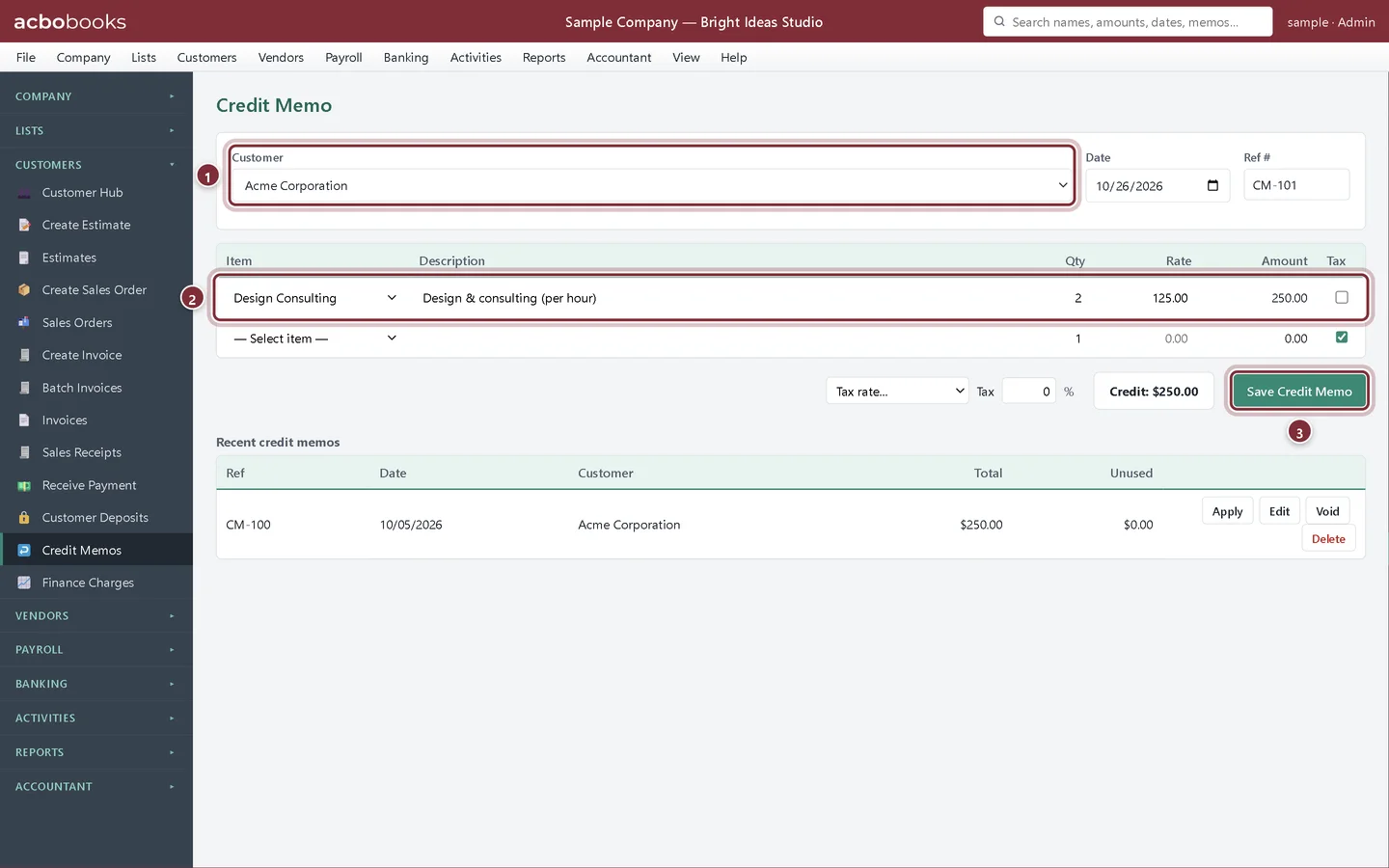
Acme Corporation's last job ran two hours over the quote, and you agree to credit them.
Step 1: Fill in Credit Memo
Choose Customers → Credit Memos. Pick the Customer, give it a Ref # and add the lines you are crediting, with tax if the original sale was taxed. Click Save Credit Memo.
- Customer.
- What you are crediting.
- Save Credit Memo.
Step 2: Find it under Recent credit memos
The list shows each credit memo's total and how much is Unused. Apply uses it against open invoices. Refund appears while some of it is unused.
- Unused.
- Apply.
- Refund.

Apply it to an invoice
Step 3: Apply Credit
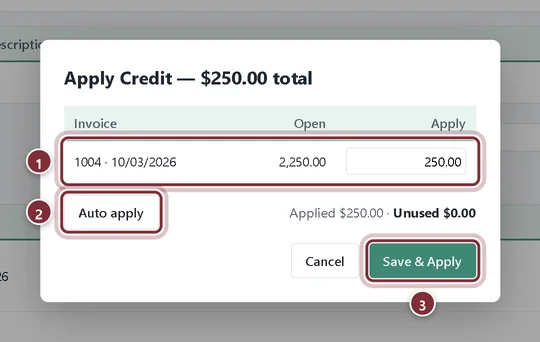
Click Apply. The customer's open invoices are listed with their open balance. Type an amount on each, or click Auto apply to use the credit on the oldest first. Click Save & Apply: the invoice balance goes down by the credit.
- The open invoice and the amount to apply.
- Auto apply.
- Save & Apply.
Refund a credit
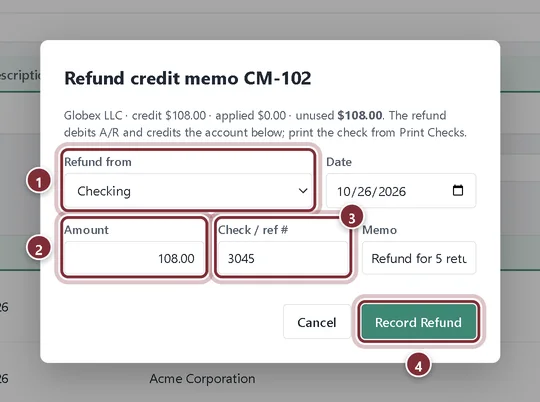
Globex LLC returned five tote bags and owes nothing, so they get their money back.
Step 4: Record the refund
Create the credit memo for the returned items, then click Refund on it. Choose the account the money leaves from in Refund from (a bank or credit card account), check the Amount, enter the check number and click Record Refund. Print the check from Banking → Print Checks.
- Refund from.
- Amount: up to the unused credit.
- Check / ref #.
- Record Refund.
Recap
- Create a credit memo for a return or adjustment.
- Apply a credit to an open invoice.
- Refund an unused credit by check or card.
Questions
Should I edit the original invoice instead?
If the invoice is wrong, correct it. If the invoice was right and something changed afterwards, such as a return or a goodwill credit, use a credit memo so both events are on record.
Can a customer's overpayment be refunded too?
An overpayment stays on the customer as a credit. Receive Payment shows it and points you to Credit Memos for the refund.
Screenshots from AcboBooks 0.2.2 with the built-in sample company. Updated October 25, 2026. Your screens may differ slightly with another version or window size.