
Your books.
Your computer.
Your business.
Double-entry bookkeeping that lives on your desk — invoices, bills, bank feeds, payroll and the reports your accountant asks for. Buy it once. Keep the file forever.
No card. No account. Nothing to cancel. · Windows 10/11 · Works with the internet off

Invoice #1042 — Harbor Cafe
INVOICE
Due Apr 14 · Net 30
Bank feed — Chequing ···4471
By the numbers
Four numbers that explain how AcboBooks is different.
Counted from the shipping build, not a brochure. The test count moves with every release.
0
servers that hold your data
The company file lives on your computer, encrypted with your password. Your books are never uploaded to us.
0+
automated accounting tests
Run on every build, checking that debits equal credits.
0
file for the whole company
Copy it, back it up, hand it to your accountant.
$0
once, for all your businesses
Two computers included, unlimited user logins, no renewal to keep working.
The AcboBooks promise
Four things that are true of every copy we ship.
Not a feature list. These are the rules the software is built around, and the reason it behaves the way a bookkeeper expects.
01
Local-first.
Your company file is a file on your own computer. Copy it, back it up, hand it to your accountant.
Harbor-Cafe.acbo · 41.8 MB · backed up 09:12
02
Double-entry, enforced.
Every transaction must balance to the cent before it saves. Closed periods lock. Changes are logged.
Dr 1,356.00 = Cr 1,356.00 · balanced
03
US & Canada ready.
Federal payroll tables, W-2 e-file output, USD and CAD side by side with per-document exchange rates.
USD $1,200.00 · CAD $1,644.00 @ 1.37
04
Multi-user on your network.
One PC hosts the file; others connect over the office LAN with record locking. No cloud relay, no monthly seat fees.
3 connected · Invoice #1042 locked by Priya
Who it's for
Built for the people who close the shop, then open the books.
Owner-operators across the United States and Canada — trades, food, retail, services — and the bookkeepers who help them. People who want to understand their numbers, not rent them.

Trades
Quotes from the van, invoices from the kitchen table.

Food & retail
Daily sales, suppliers paid, sales tax that reconciles.

Partners & small teams
Two people in the same file, over the office network.
The product
One install. The whole back office.
Pick an area. Everything you see is in the box — no add-ons, no tiers.
From estimate to paid, without leaving the ledger.
Invoice #1042 — Harbor Cafe
INVOICE
Due Apr 14 · Net 30
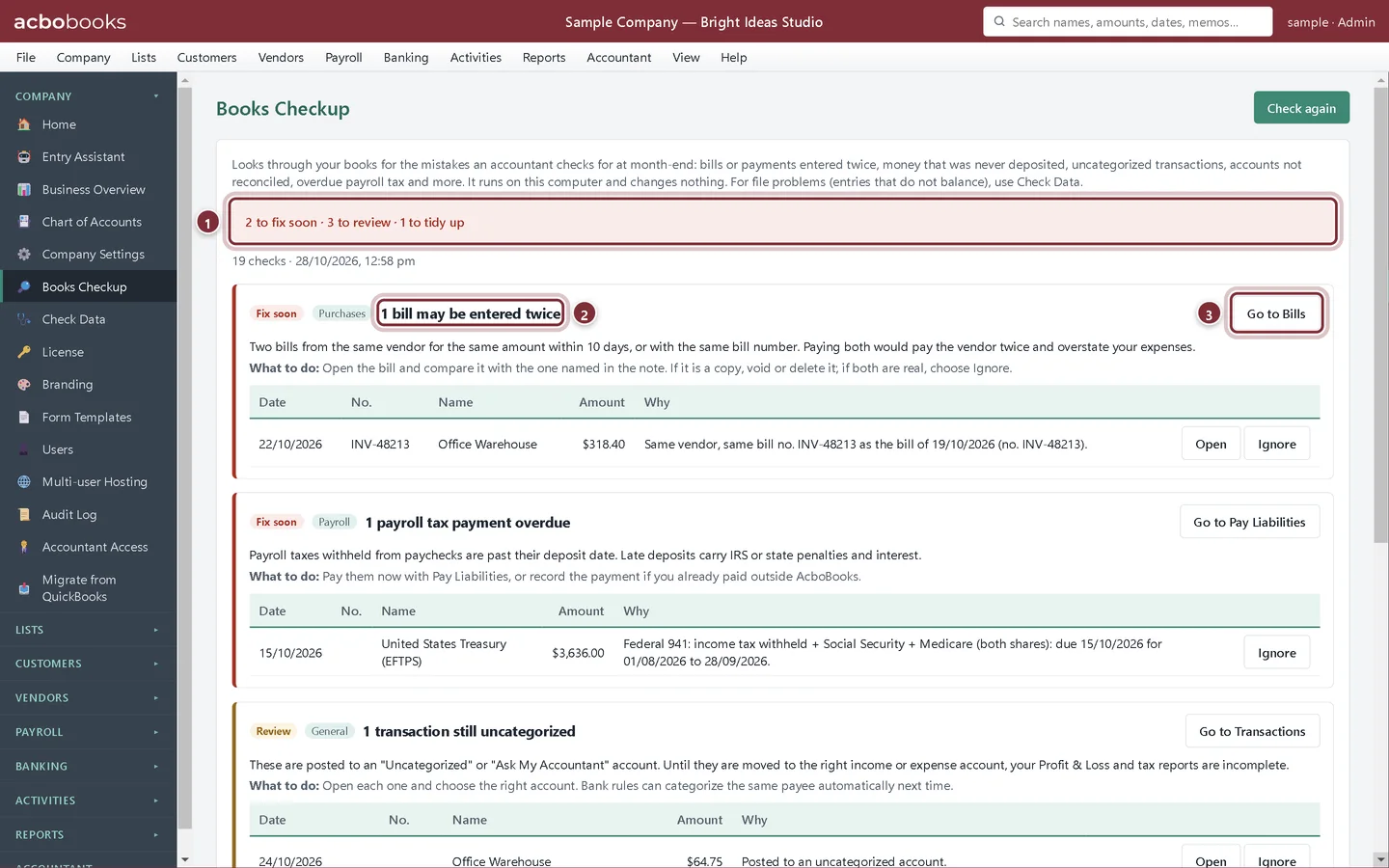
Books Checkup
Catch the mistakes before your accountant does.
One click on Company → Books Checkup runs 19 checks over your books and lists what needs fixing, most serious first. Each finding has a button that takes you straight to it.
It only reads. Nothing changes until you fix it yourself, and a finding that is correct can be set aside.
Why AcboBooks
Built for the owner who still wants to understand the numbers.
Cloud tools hide the ledger behind a dashboard. AcboBooks keeps the ledger where you can see it — and keeps you in control of the file.
01
Your books are a file on your drive.
Back it up, copy it, hand it to your accountant on a USB stick. No subscription holds your history hostage, and no outage locks you out at month-end.
02
The ledger refuses to be wrong.
Every transaction must balance before it saves. Closed periods lock. Changes leave an audit trail. Exchange rates are stored per document, not guessed.
03
A traditional desktop layout.
Customers, vendors, items, classes, jobs, registers and recurring transactions: the accounting workflow you know, not a re-education.
Moving from QuickBooks® Desktop
Bring your lists and open balances across.
AcboBooks reads your QuickBooks Desktop lists and open invoices and bills, and rebuilds your chart of accounts, names, items, and open balances. You verify the totals before anything is final.
STEP 1
Export or connect
Export an IIF from QuickBooks, or let AcboBooks pull the data directly while QuickBooks is open on the same PC.
STEP 2
Map and review
Accounts, customers, vendors, items, and classes are mapped automatically; anything unusual is flagged for you to confirm.
STEP 3
Reconcile and go
Opening receivables, payables, and bank balances are compared line by line. Re-running the import updates matching records instead of adding copies.
How the import works, and free migration help →
On QuickBooks or Sage 50? A note for you, and a free move check →
Rather we did it? We move it for you, and check every balance →
Will your data come across? Pick your QuickBooks.
Your data, your rules
Local-first is a feature, not a limitation.
We don't host your books, so we never hold them, mine them, or charge you to get them back.
One file, in plain sight
The company file lives in a folder you choose. Copy it, sync it, archive it — it's yours.
Password-protected, with roles
Admin, bookkeeper, and view-only users. Eight bad logins and the door locks for a minute.
Works with the internet off
Month-end during an outage is still month-end. Nothing in the core needs a connection.
Licence that works offline too
Activation is a signed key, checked on your machine. Your books open with or without a connection; the licence is re-checked about once a day when you are online.

What's in the file
Is AcboBooks right for you?
Five taps, thirty seconds, and an honest answer, including when it isn't. Start here: where is your business?
Pricing
One product. One price. No monthly meter.
Try the whole thing for 15 days, then buy it once. Two computers included, more for $149.99 each, once. No monthly fees, no "plans" to decode, and your file is yours either way.
15-day trial
$0
no card · no account · 15 days
AcboBooks Pro
$399.99
one-time · all your businesses · yours to keep
Less than 3 months of QuickBooks Online Plus ($140 a month, October 2026)
30-day money-back guaranteeFull refund if you ask within 30 days. Refund policy
Everything you enter during the trial stays in your file and unlocks the moment you paste the licence key. Pay by card through Paddle (cards, PayPal, Apple Pay, Google Pay; tax added where it applies) or by invoice. Prices in USD.
Do the sum
What QuickBooks costs you, next to a price you pay once.
$140 a month for up to 5 users. Intuit's US list price, October 2026.
People using it at the same time: 2
QuickBooks Online Plus allows up to 5. AcboBooks: 2 computers included, more $149.99 each, once.
Over 5 years
QuickBooks, 5 years
≈ $8,400
$140 a month, every month
AcboBooks Pro
$399.99
once · payroll included · updates after year 1 optional
QuickBooks
$8,400
AcboBooks Pro
$399.99
You keep about
$8,000
over 5 years, before payroll
QuickBooks figures are Intuit's US list prices as checked in October 2026 (see our QuickBooks Online comparison), before promotions, taxes and add-ons, and assume no price rise. AcboBooks Pro is $399.99 once with 12 months of updates and support; renewing updates after that is optional and the software keeps working either way. QuickBooks® is a registered trademark of Intuit Inc. AcboBooks is not affiliated with, endorsed by, or sponsored by Intuit.
Compared
Desktop and local, on purpose.
How AcboBooks stacks up against the two ways most small businesses keep books today.
| Feature | AcboBooks | Typical cloud accounting | Spreadsheets |
|---|---|---|---|
| Your data | |||
| Where your data lives | Your computer | Vendor's servers | Your computer |
| Works without internet | Yes | No | Yes |
| Account or sign-up required | None | Yes | None |
| Take your data with you | It's a file — always | Export to spreadsheets | It's a file |
| Automatic backup before changes | Yes, on your drive | Vendor-held only | No |
| Doing the books | |||
| Enforced double-entry | Yes | Yes | No |
| Closed-period lock & audit trail | Built in | Usually | No |
| Bank feeds | OFX + statement import | Yes | No |
| Payroll & W-2 file for SSA upload | Included | Add-on | No |
| Multi-currency, per-document rates | Included | Higher tiers | Manual |
| Inventory, jobs & classes | Included | Higher tiers or add-on | Manual |
| Print cheques & statements | Yes | Varies | No |
| Imports QuickBooks® Desktop | Lists + open balances | Varies | Manual |
| Working together | |||
| Multi-user | Office network, record locking | Internet | Conflicts |
| Accountant access | Free — copy the file or add a user | Often a paid seat | Email the file |
| Works on the PCs you already own | Windows 10/11, offline | Any browser | Yes |
| Cost | |||
| How you pay | Once — $399.99 | Monthly, per seat | Free |
| Price can rise next year | No — you own it | Commonly | No |
| Updates & support | 12 months included | Included while subscribed | None |
"Typical cloud accounting" describes common subscription products in general, not any single vendor.
Questions
Before you download
"Ack-bo Books." Four letters, two syllables.
No. AcboBooks is independent software. It can import data that QuickBooks® Desktop exports, the same way a spreadsheet can. QuickBooks is a registered trademark of Intuit Inc.
Nothing bad. It stays on your computer and opens read-only, so you can still look up anything. Paste a licence key and it's fully editable again — every transaction you entered during the trial is still there.
Yes. You own the version you buy, for as many years as you like to run it. The price includes 12 months of updates and email support; after that you can keep using it as-is, or renew updates when there's something you want.
Windows 10 and 11 today. A Mac version is planned for the future; tell us if you need it and we'll let you know when there is news.
Yes. Give them a copy of the file, or add them as a user on your office network. There's no "accountant seat" fee.
You paste a licence key once. It's verified on your machine with a signed certificate; no account is needed. When online, the app re-checks the licence about once a day, and it keeps working offline in between.
Get started
Your books, on your desk, this afternoon.
Download, open the sample company or import your own, and watch the ledger balance.
No card. No account. Nothing to cancel.