
Accounting software for Windows
Accounting software for Windows 10 and 11, made to feel at home on a PC
AcboBooks is a native Windows program: a menu bar across the top, a sidebar, windows that open over each other, and printing to your own printer. If you grew up on QuickBooks Desktop or Sage 50 on a PC, the layout will feel familiar.
It installs from the Microsoft Store or from our site, runs on Windows 10 and 11, and is bought once for $399.99 for two computers.
No card, no account. Windows 10 and 11. United States and Canada.
What it means
In practice
Installed the Windows way
Get it from the Microsoft Store, which signs the package and handles updates, or download the Store-signed installer from our site. It runs under your Windows account like any other desktop program.
Uses what your PC already has
Print invoices, statements and cheques to the printer on your desk or to PDF. Windows remembers the company file password for your account, so the file opens without retyping it, and asks on any other computer.
PCs that work together
One Windows PC hosts the company file and others on the office network connect to it. Windows asks once whether to allow AcboBooks on private networks; after that, everyone works in the same books.
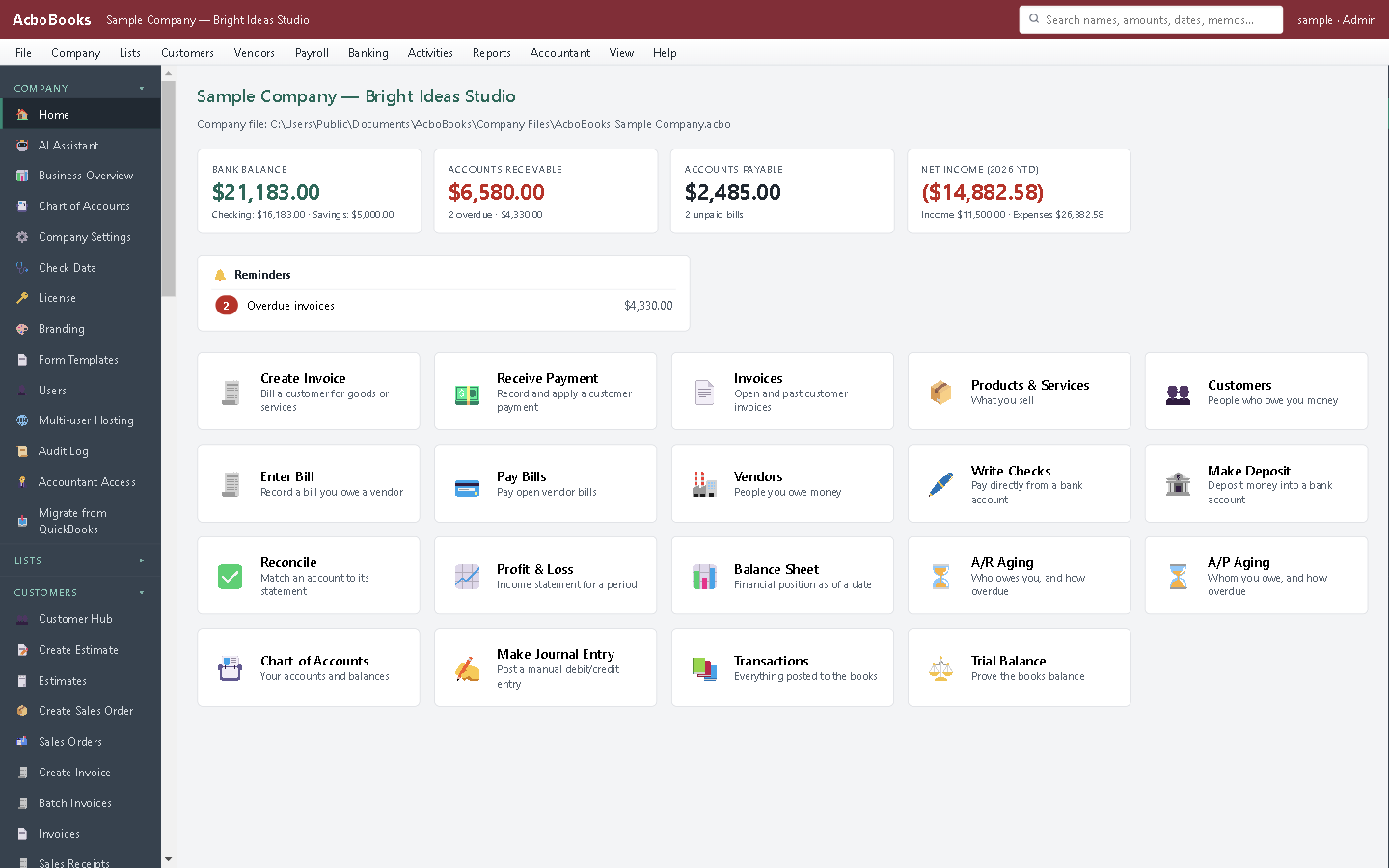
Menu bar, sidebar and your company file, on Windows 11.
A PC program, with a menu bar and a print button
Open Customers, Vendors, Employees or Banking from the menu, or find any customer, item, invoice or bill with the search box, which also finds a transaction by amount, date or memo. Zoom the whole window with Ctrl and plus or minus when the screen is far away.
When the day is done, print the cheques, save the invoices as PDF, and close the program. It can back up the file as it closes.
What is in the licence
The whole job, in one price
Sales and money in
Purchases and money out
Banking and books
Payroll and people
Stock and jobs
Reports and sharing

Print to your own printer or save as PDF.
What it does not do
· Windows only today: no Mac version yet (one is coming soon) and no phone app.
· It does not run on Windows 7 or 8.
· No automatic bank feed for most banks: it imports the statement file your bank provides, and downloads directly from banks that offer OFX Direct Connect.
· One company per file; open as many files as you have businesses.
Questions people ask
Before you download
Which versions of Windows does it support?
Windows 10 and Windows 11. A modest office PC is plenty; the company file is a single database on your drive.
Should I install from the Microsoft Store or the website?
Either. Both are the same Store-signed program. The Store version updates itself through the Store; the website download is for PCs where the Store is not available.
Will it run on a Mac?
Not yet. A Mac version is coming soon. Some people run it in a Windows virtual machine on a Mac, but we do not support that setup.
Can I use a Windows PC as a server for the office?
Any Windows 10 or 11 PC can host. It needs to stay on with the company open while others work. You do not need Windows Server or a shared drive.
Does it work with my printer and cheque stock?
It prints through Windows, so any printer Windows can use will work. Cheques print one per page, to paper or to PDF, singly or in a batch from the cheque register.
Coming from something else?
How it compares to what you use now
Get started
Made for the PC you already own.
Install the 15-day trial on Windows 10 or 11. No card, no account.
No card. No account. Nothing to cancel.