
Manager.io alternative
A Manager.io alternative with US and Canadian payroll built in
Manager's free desktop edition is why many small businesses keep their own books on their own computer. This page is for the point where a general-purpose, worldwide program is not enough: US or Canadian payroll with the right tables and year-end forms, sales tax the way the IRS and CRA expect it, two people in the file, and someone to ask.
AcboBooks is built for exactly those two countries, as a Windows desktop program with a one-time price, the company file on your PC encrypted with your password, and support included.
No card, no account. Windows 10 and 11. Manager prices and features checked October 2026.
Manager pricing, October 2026
Desktop edition
single user, one computer
Free
Server and Cloud editions
for multi-user access
Paid subscriptions, priced on manager.io
AcboBooks Pro
$399.99 once
Why people leave
What Manager users tell us, and what changes
Payroll is generic
Manager has payslips but no US federal and state tables, no CPP and EI, no W-2, 1099, T4 or T4A. AcboBooks includes all of it, with direct deposit files and liability payments.
Sales tax is a tax code, not a return
US sales tax by agency and jurisdiction, and Canadian GST/HST with input tax credits, PST and QST, come as filing-ready figures in AcboBooks, not as a generic tax column.
Multi-user means a server or the cloud
The free edition is one person on one computer; sharing the books means a paid Server or Cloud edition. An AcboBooks licence covers two computers on the office network with record locking.
Reconciliation and bank import
AcboBooks imports OFX, QFX and CSV, matches against entered transactions, learns categories and produces a reconciliation report with a closing-date lock.
Support and a local focus
Manager serves every country at once; AcboBooks serves two, with email support for twelve months and help written for US and Canadian books.
Side by side
AcboBooks and Manager, row by row
Manager answers are from its own published plans and documentation, checked October 2026.
| AcboBooks Pro | Manager | |
|---|---|---|
| Your data | ||
| Where your books live | A file on your computer | A file on your computer (desktop edition) |
| Works without internet | Yes, fully | Yes (desktop edition) |
| Account or sign-up required | None | None for desktop |
| Take your data with you | It is a file, encrypted with your password | Backup file |
| File encryption | AES-256 inside the database, your password | None built in |
| Doing the books | ||
| Enforced double-entry | Yes, enforced | Yes |
| Closing date and audit trail | Closing date, password, audit trail | Lock date; history |
| Bank feeds | OFX/QFX and statement import | Statement import with rules |
| Payroll | Included: W-2, 1099, T4, direct deposit | Generic payslips; no US or Canadian tables or forms |
| Sales tax and GST/HST | By agency, filing-ready, ITCs netted | Tax codes; generic reporting |
| Multi-currency | Included, dated rates | Yes |
| Inventory, jobs and classes | Included: inventory, jobs, classes | Inventory; divisions |
| Working together | ||
| Multi-user | Office network, record locking, 2 computers per licence | Server or Cloud edition, paid |
| Accountant access | Free: copy the file or add a user | Send a backup |
| Runs on | Windows 10 and 11 | Windows, macOS, Linux |
| Cost | ||
| How you pay | Once, $399.99 | Free desktop; subscription for Server or Cloud |
| Price can rise next year | No, you own it | Desktop no; subscriptions yes |
| Updates and support | 12 months included, then optional renewal | Frequent updates; forum support |
Three years
What three years really cost
The desktop edition is free, so the three-year table is not about licence cost. The cost is payroll done by hand or elsewhere, generic tax handling, and a subscription the moment a second person needs the books.
AcboBooks Pro is $399.99 once, with 12 months of updates and support included and optional renewals after that. Against free software the question is not the licence; it is whether the hours spent on payroll, invoicing and year-end, and the things a second person cannot do, are worth more than $399.99 to the business.
Being fair
Who should stay with Manager
Stay with Manager if you are a one-person business with no payroll, if you need macOS or Linux, if you trade in a country other than the US or Canada, or if free is the deciding factor. It is good general software. AcboBooks is for a US or Canadian business with staff, sales tax to file, and more than one person in the books.
What AcboBooks does not do
· No phone app and no Mac version; it is a Windows desktop program.
· No live bank connection; it imports the OFX, QFX or CSV statement your bank provides.
· Card payments go through a Stripe payment link on the invoice, not a built-in processor.
Moving your books
From Manager to AcboBooks
Manager exports every list and report as a spreadsheet. AcboBooks imports the chart of accounts, customers, vendors and items, and the new books start at a date you choose.
In Manager, export the chart of accounts, customers, suppliers and inventory items, and a trial balance as of your start date.
In AcboBooks: create the company (choose Canada or United States) and import each list; account types and tax rates map automatically.
Enter opening balances from the trial balance and recreate open invoices and bills.
Import bank statements (OFX, QFX or CSV) for the history you want to keep, then compare the trial balance in both.
Keep Manager installed for prior years; its desktop edition keeps opening its own backups.
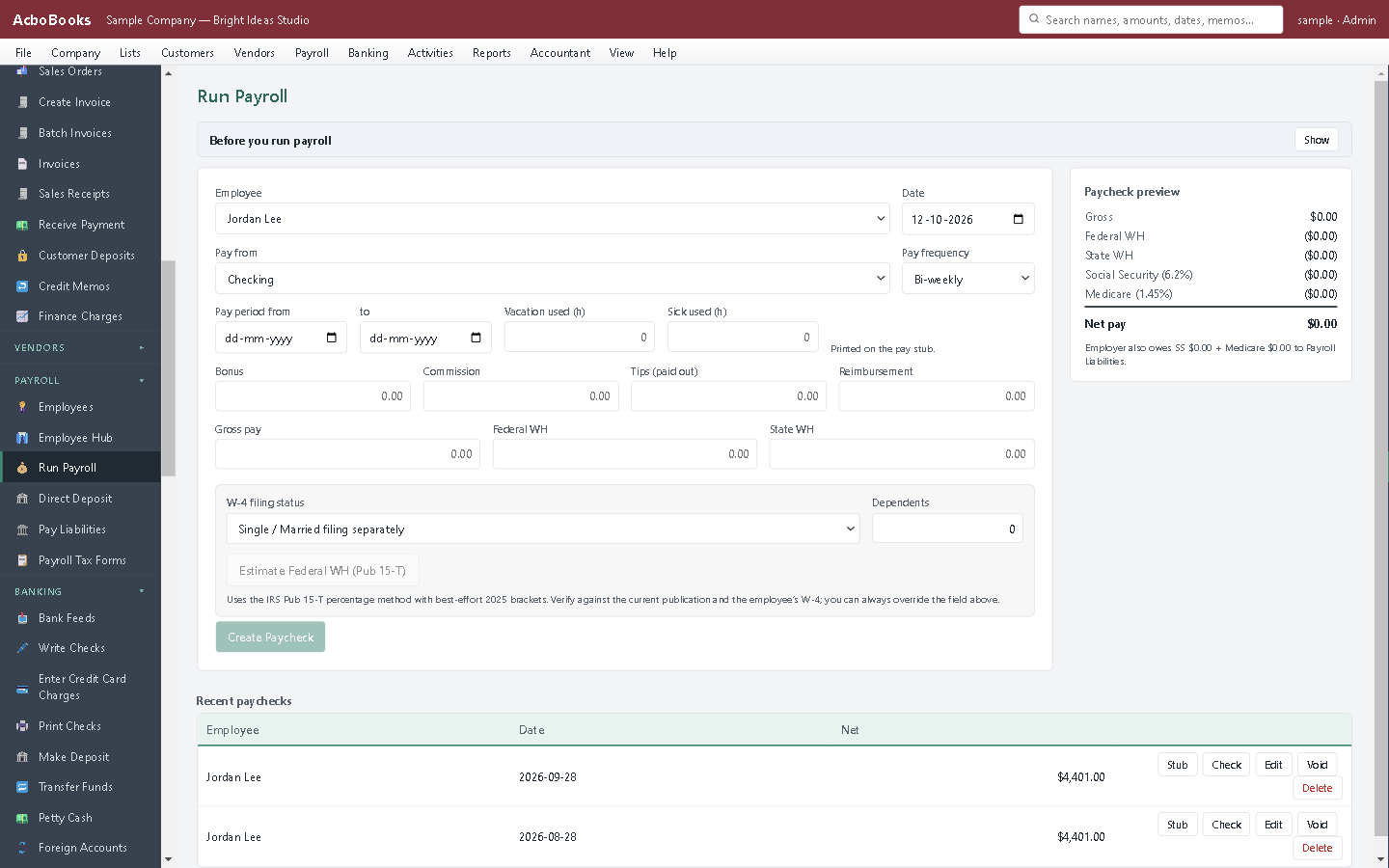
Payroll with the US and Canadian tables and forms.

Reports with drill-down to the transaction.
Questions people ask
Leaving Manager: the practical questions
Why pay when Manager's desktop edition is free?
For US and Canadian payroll with the right tables and year-end forms, filing-ready sales tax and GST/HST, two people in the books without a server, an encrypted file, and support. If you need none of those, Manager is a fine choice.
Does AcboBooks run on macOS or Linux?
No. Windows 10 and 11 only.
Is the data as portable?
The company file is yours and opens on any licensed computer with your password; every list and report exports to Excel and CSV. The file is encrypted, which Manager's is not.
Does it cover both countries?
Yes. Each company file picks its country; one licence runs a US and a Canadian business.
Is there a free trial?
Yes. The trial runs for 15 days with every feature, no card and no account. If you buy, nothing is re-entered; the file you were working in simply stops counting down.
What does the licence cover?
$399.99 buys AcboBooks Pro for one business on two computers, for as long as you like, with 12 months of updates and email support. After that the software keeps working; renewing updates is optional.
Is my data safe on my own computer?
Each company file is encrypted inside the database with your password (AES-256), so a copied or stolen file cannot be read. Back it up like any file; the app can do that automatically each time it closes.
Can my accountant get in?
Yes, without paying for a seat. Give them a backup copy, or add them as a user on your network, or use the accountant invite from inside the app. Their adjusting entries import back without double-posting.
Other comparisons
Leaving something else?
Get started
Try it against your real Manager books.
Download the 15-day trial, bring your lists across, and run one month-end in both. Then decide.
No card. No account. Nothing to cancel.
Manager (manager.io) is a product of NGSoftware Pty Ltd. AcboBooks is not affiliated with, endorsed by, or sponsored by NGSoftware. Statements about Manager reflect its website and documentation as of the date shown and may have changed.