
In this lesson you will
- Find the GST/HST rates that came with your file
- Give a service an HST tax code
- Charge HST on an invoice
- Know how PST and QST provinces are set up
Before you start
- A Canadian company file (Company Settings shows the Canadian edition and your province)
Check your rates
Step 1: Open Lists → GST/HST Rates
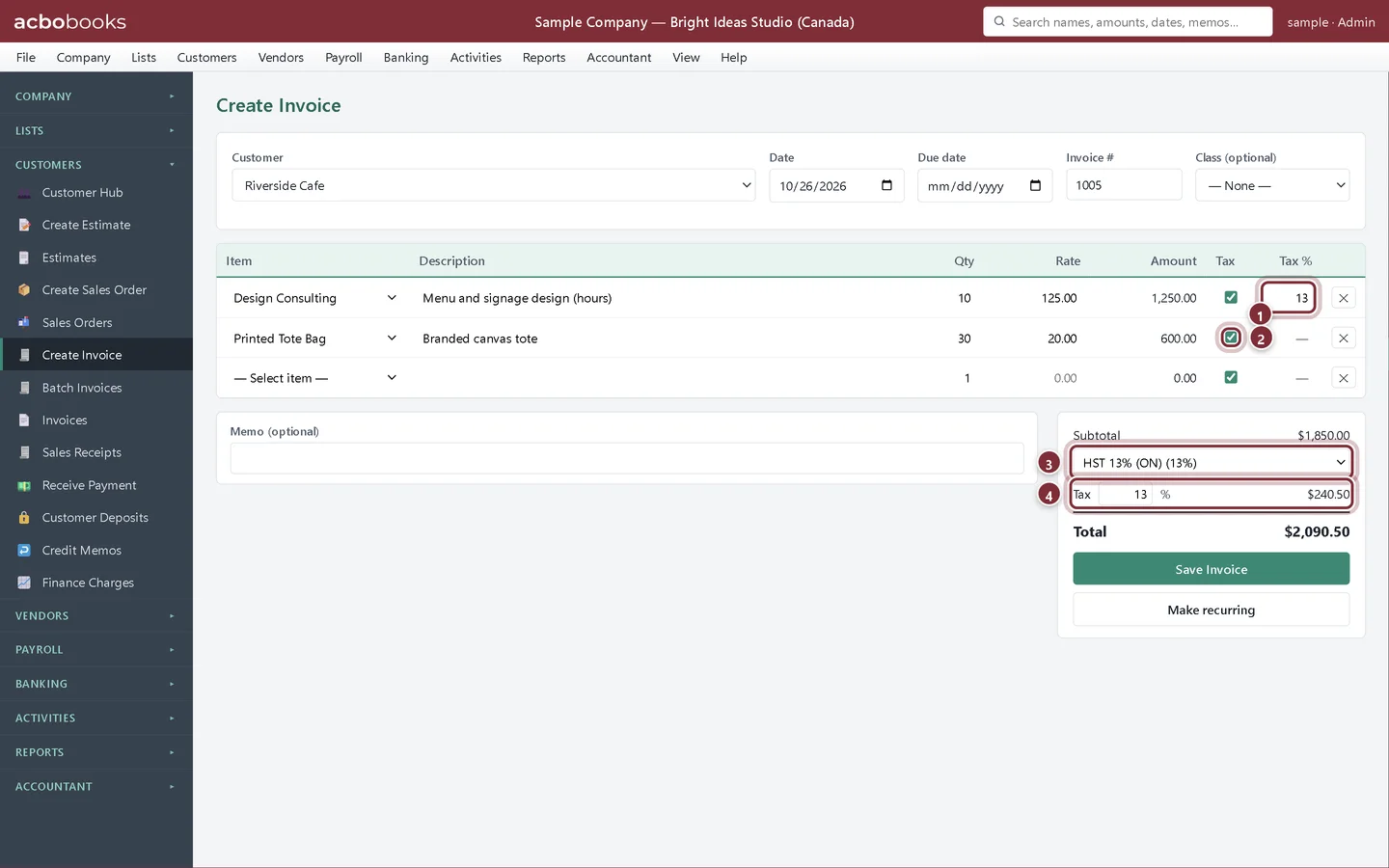
In the Canadian edition the rate list is called GST/HST Rates. When the file is created, AcboBooks adds the rates for your province: in Ontario, HST 13% (ON) and GST 5% (for sales to customers in GST-only provinces and territories). The Type column says whether each rate is GST/HST, PST/RST or QST, which decides the account its tax posts to. Add any other rate you need with + New Tax Rate.
- GST/HST Rates in the Lists group
- GST 5%
- HST 13% (ON)
- + New Tax Rate
Make your services taxable
Step 2: Edit the item in Lists → Products & Services
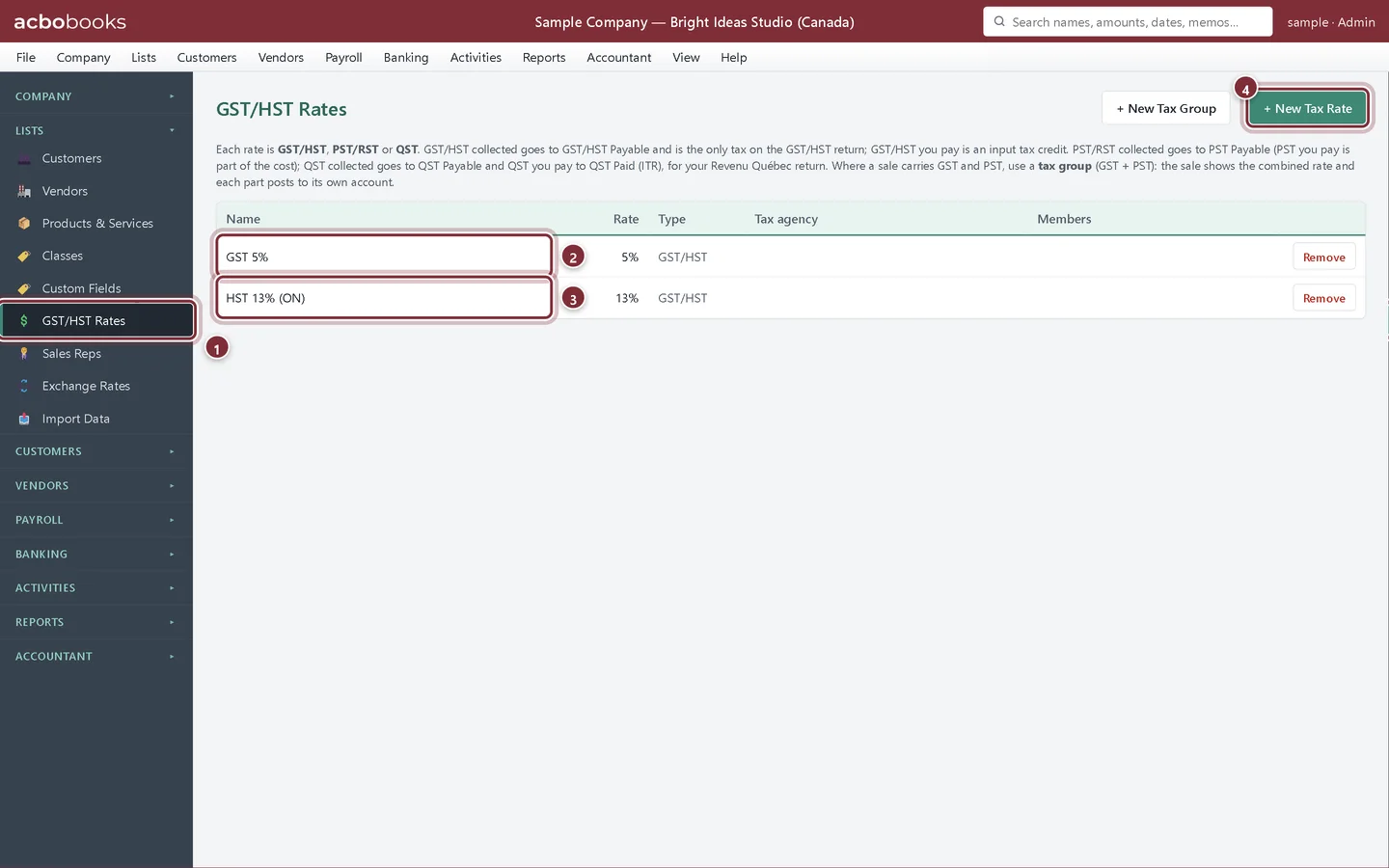
Most services are taxable in Canada. In the sample company the services start as not taxable, so click Edit on Design Consulting, choose HST 13% (ON) in Sales tax code (default rate for this item), tick Taxable item and click Save Changes.
- Sales tax code: HST 13% (ON)
- Taxable item
- Save Changes
Charge HST on an invoice
Step 3: Create the invoice
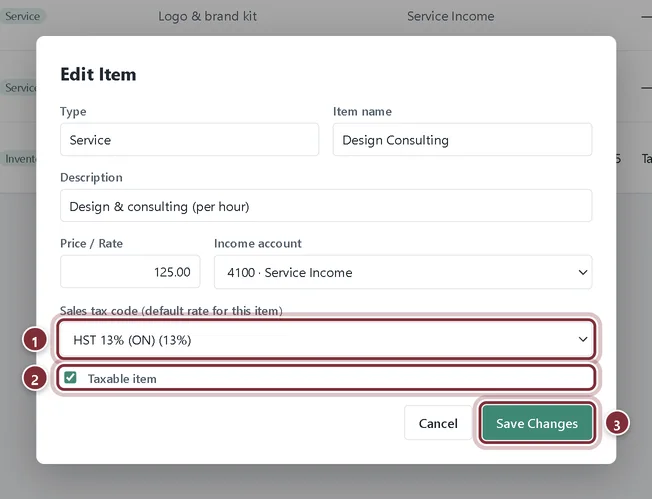
Go to Customers → Create Invoice, choose the customer and add the lines. Pick HST 13% (ON) in the rate list under Subtotal. Lines for items with a tax code show that code's percentage in Tax %; other ticked lines use the invoice rate.
- Tax % filled from the item's tax code
- Tax ticked on the tote bags, so they use the invoice rate
- The invoice rate: HST 13% (ON)
- Tax: $240.50 on $1,850.00
Step 4: Save the invoice
Click Save Invoice. The HST is credited to GST/HST Payable, and it counts on line 103 of the GST/HST return worksheet for the period of the invoice date.
If you charge PST or QST
Step 5: Charge the GST + PST group
In BC, Saskatchewan, Manitoba and Quebec, pick the tax group, such as GST + PST 12% (BC), on the invoice. The customer sees one combined rate, and AcboBooks splits the tax: the GST part goes to GST/HST Payable and counts on line 103 of the GST/HST return, the PST or RST part goes to PST Payable, and QST goes to QST Payable. Only GST/HST is on the GST/HST return.
Recap
- Find the GST/HST rates for your province under Lists → GST/HST Rates
- Give a taxable service an HST tax code
- Charge HST on an invoice
- Keep provincial sales tax separate from GST on your return
Questions
My customer is in another province. Which rate do I charge?
Generally the rate of the province where the sale is made, which for goods is usually where they are delivered. Pick that province's rate on the invoice; add it with + New Tax Rate if it isn't in your list.
Where do PST and QST rates go?
In the same GST/HST Rates list. Give each rate the right Type (PST/RST or QST), and combine it with GST 5% in a tax group so each part of the tax posts to its own account.
Related
Screenshots from AcboBooks 0.2.2 with the built-in sample company. Updated October 25, 2026. Your screens may differ slightly with another version or window size.