
In this lesson you will
- Enter a bill with GST/HST
- See where the tax goes
- Handle PST and purchases with no GST/HST
- Claim GST/HST on inventory purchases
Before you start
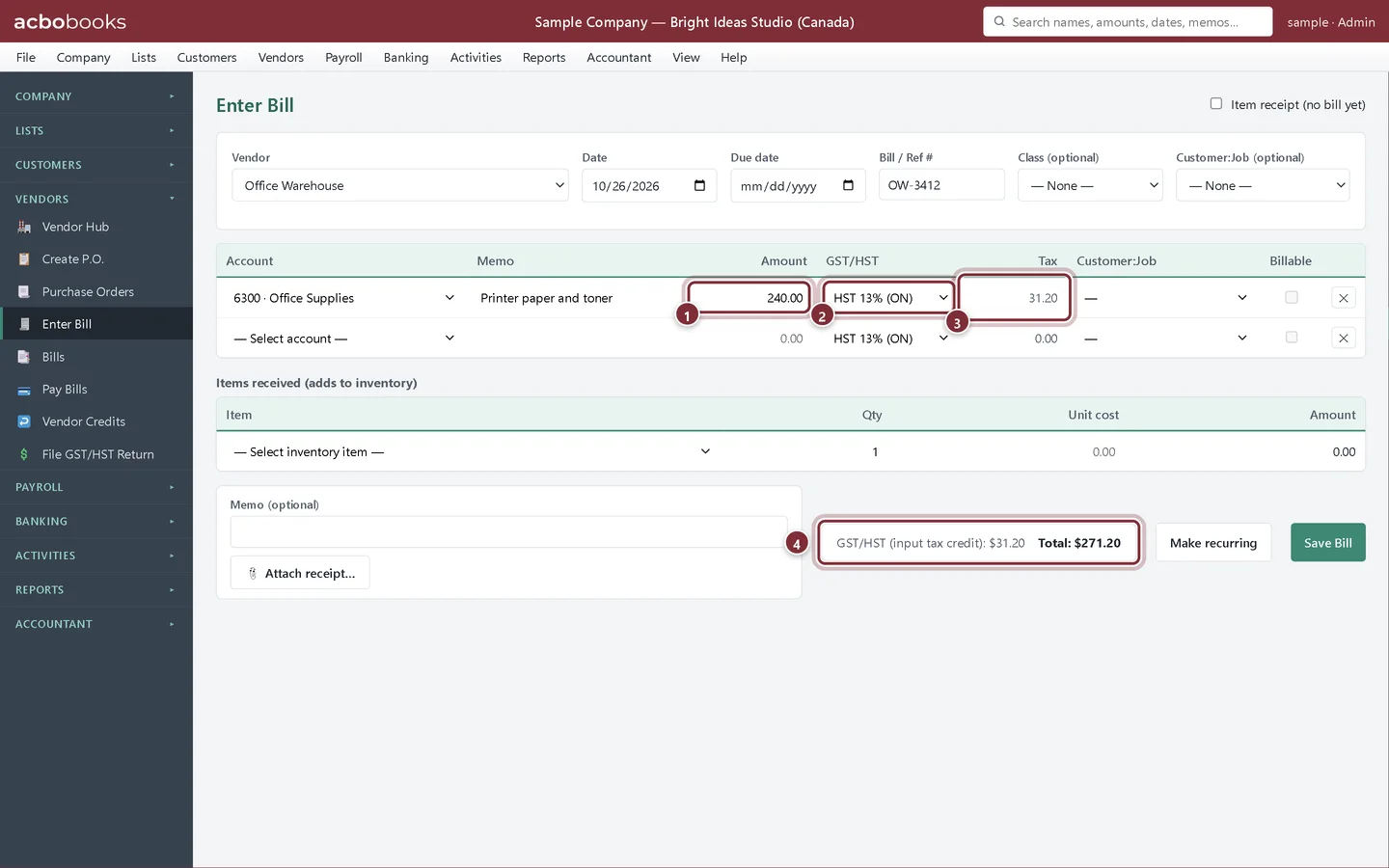
Enter a bill with GST/HST
Step 1: Fill in the expense line
Go to Vendors → Enter Bill, choose the vendor and enter the bill number. On each expense line, type the Amount before tax. The GST/HST column starts on your HST rate (or GST where there is no HST) and Tax shows the tax on that line. Check the totals against the vendor's bill, then click Save Bill.
- Amount: the price before tax
- GST/HST: the rate charged on this line
- Tax: worked out for you
- The footer: GST/HST (input tax credit), the GST/HST you can claim back, and the bill's Total
Step 2: Where the tax goes
The expense account gets the $240.00, the $31.20 goes to GST/HST Paid (ITC), and the vendor is owed $271.20. The ITC counts on line 106 of the GST/HST return worksheet for the bill's date.
Other purchases
Step 3: Cheques work the same way
Banking → Write Cheques has the same GST/HST and Tax columns, for purchases you pay on the spot.
Step 4: No GST/HST, or PST on the bill
Choose No tax for purchases without GST/HST, such as bank charges, insurance or wages. If the vendor charged GST and PST, you can pick the combined rate, such as GST + PST 12% (BC): AcboBooks claims only the GST part as an input tax credit and adds the PST to the line's cost, because PST and RST are not recoverable. QST you pay goes to QST Paid (ITR) for your Revenu Québec return.
Step 5: Inventory on a bill
The Items received lines have no GST/HST column. For a bill with inventory, add an expense line on the account 1250 · GST/HST Paid (ITC) with the tax amount and No tax, so the credit is still counted.
Recap
- Enter the amount before tax and the GST/HST rate on each line
- Know that the tax goes to GST/HST Paid (ITC)
- Know that PST stays in the expense and only GST/HST is claimed
- Claim GST/HST on inventory with an expense line to the ITC account
Questions
The vendor's bill shows the tax as one amount. What do I enter?
Enter the amount before tax and pick the rate. If AcboBooks' tax differs from the bill by a cent or two because of rounding, adjust the Amount so the total matches what you owe.
Can I see my ITCs before filing?
Yes: line 106 on Reports → GST/HST Return for the period, and the GST/HST Paid (ITC) account register for every entry.
Related
Screenshots from AcboBooks 0.2.2 with the built-in sample company. Updated October 25, 2026. Your screens may differ slightly with another version or window size.