
In this lesson you will
- Sell an inventory part on an invoice
- See the cost of goods sold entry the sale posts
- Understand where the cost figure comes from
- Know what happens when you sell more than you have
Before you start
Make the sale
Step 1: Add the item to an invoice
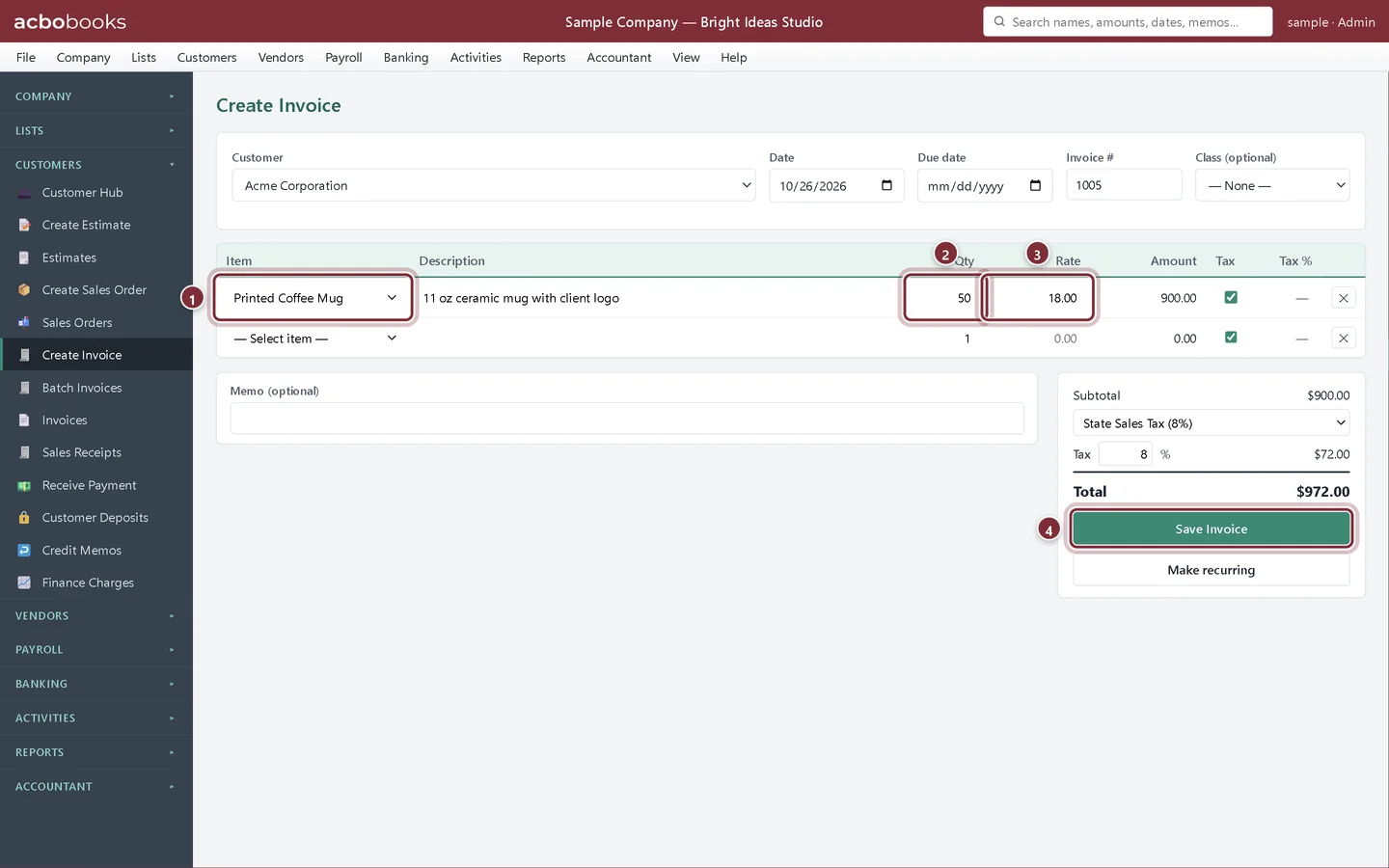
Acme Corporation orders 50 mugs. Open Customers → Create Invoice, choose the customer and pick the inventory part in Item. The description and price fill in from the item. Type the Qty, choose the tax rate and click Save Invoice. A sales receipt works the same way for a sale paid on the spot.
- Item: the inventory part.
- Qty: units sold.
- Rate: the selling price, filled in from the item.
- Save Invoice records the sale and takes the units off stock.
See the cost of the sale
Step 2: Open the invoice in Activities → Transactions
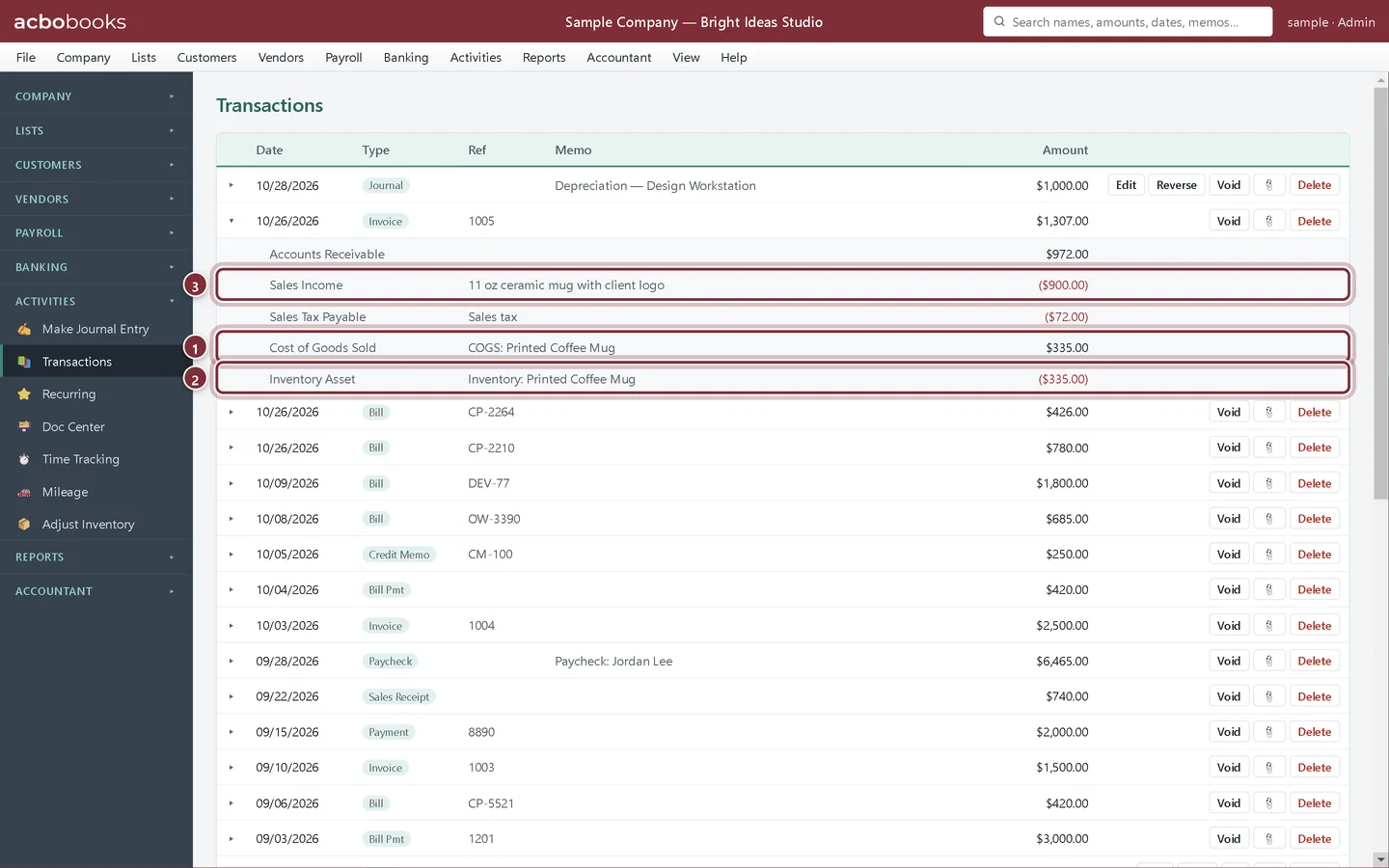
Click the arrow next to the invoice in Transactions to see every line it posted. Besides the sale and the sales tax, there are two lines you didn't type: the cost of the 50 mugs moves from Inventory Asset to Cost of Goods Sold.
- Cost of Goods Sold: 50 × $6.70 average cost = $335.00.
- Inventory Asset goes down by the same $335.00.
- Sales Income: the $900.00 sale.
Step 3: Read it on the Profit & Loss
On the Profit & Loss, the $900.00 sits in Sales Income and the $335.00 in Cost of Goods Sold, so the gross profit on the order is $565.00, a gross margin of about 63%. The mug count drops from 180 to 130 and the stock value from $1,206.00 to $871.00.
Returns and running short
Step 4: If you sell more than you have
AcboBooks doesn't stop you selling more units than are on hand, so you can invoice goods that are about to arrive. The quantity goes below zero until the stock comes in. Company → Check Data warns about any item with a negative quantity, so check it before you close a month.
Step 5: Customer returns
When a customer sends goods back, record it with a credit memo for the item; see Credit memos and refunds. If the returned units can't be resold, take them off stock afterwards with Adjust Inventory.
Recap
- Sell an inventory part on an invoice or sales receipt.
- Find the cost of goods sold lines in Transactions.
- Know the cost comes from the item's average cost.
- Watch for negative stock with Check Data.
Questions
Can I change the cost AcboBooks used for a sale?
Not on the invoice. The cost comes from the average cost when the sale is saved. If the average was wrong because a bill had the wrong price, correct the bill.
Why is the invoice total in Transactions bigger than the invoice?
Transactions shows the total of all the debit lines, and the cost of goods sold line is one of them. The customer still owes only the invoice total.
Do sales orders take stock off the shelf?
No. A sales order commits the units (they count against available stock in Stock Status by Vendor) but stock only drops when you invoice.
Related
Screenshots from AcboBooks 0.2.2 with the built-in sample company. Updated October 25, 2026. Your screens may differ slightly with another version or window size.