
In this lesson you will
- Check each employee's W-2 boxes
- Print W-2 worksheets for employees
- Export the EFW2 file for SSA BSO
Before you start
- Prepare Form 941 and Form 940
- Each employee's SSN and address on the Employees screen
Check and print the W-2s
Step 1: Open the W-2 worksheet
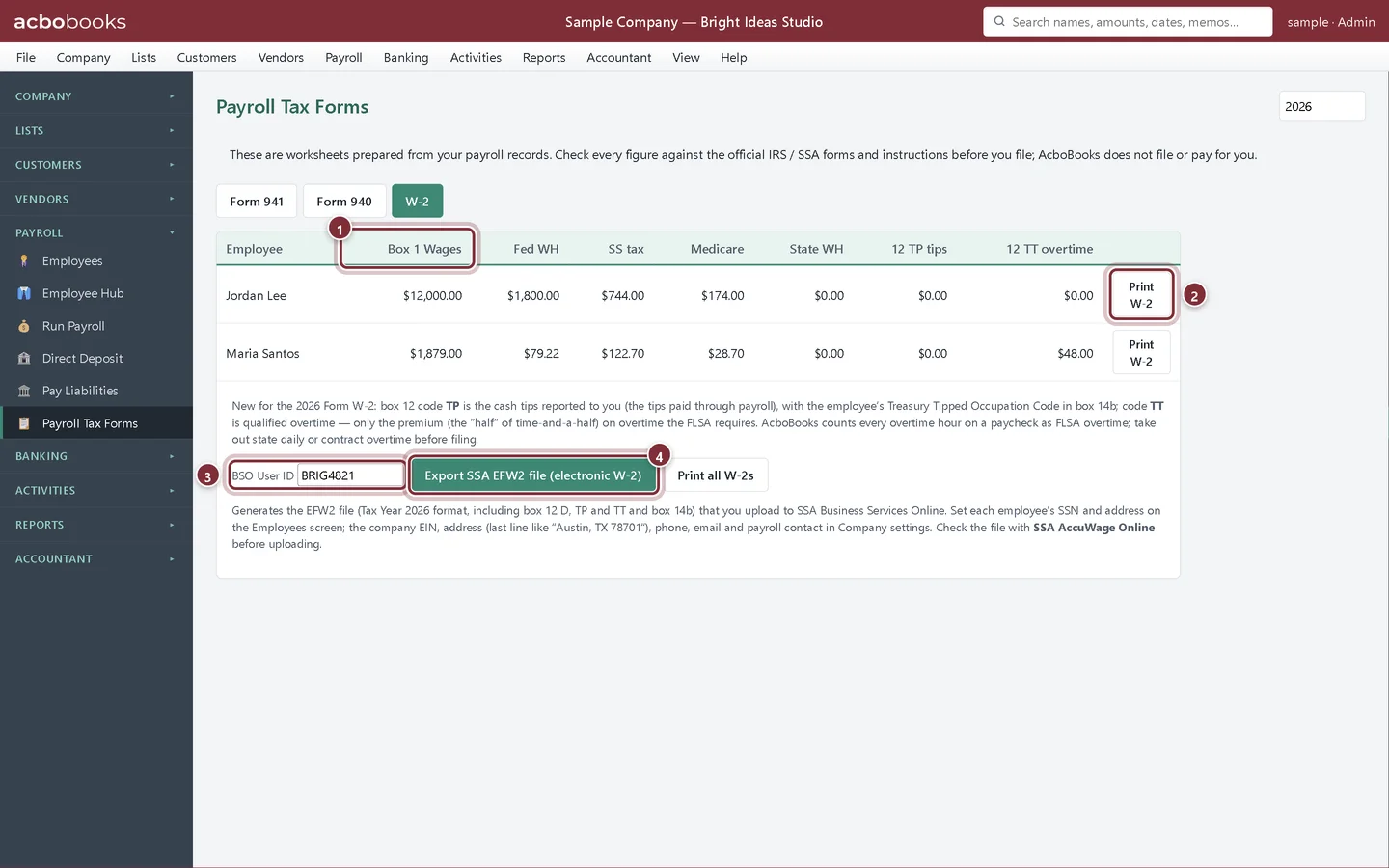
In Payroll → Payroll Tax Forms click W-2 and check the year. Each row is one employee's W-2: box 1 wages, federal withholding, Social Security and Medicare tax, state withholding, and the new 2026 box 12 codes TP (tips) and TT (qualified overtime).
- Box 1 Wages: wages after 401(k) and Section 125 deductions.
- Print W-2 saves one employee's W-2 as a PDF; Print all W-2s does every employee.
- BSO User ID: your 8-character SSA Business Services Online user ID, written into the file.
- Export SSA EFW2 file (electronic W-2) saves the file to upload to SSA.
File electronically
Step 2: Export and check the EFW2 file
Type your BSO User ID and click Export SSA EFW2 file (electronic W-2). If an SSN, address or company detail is missing, AcboBooks lists it under Fix before filing. Check the saved file with SSA AccuWage Online, then upload it in Business Services Online.
Recap
- You can check each employee's W-2 figures.
- You can print W-2 copies for employees.
- You can export and validate the EFW2 file.
Questions
What if a W-2 figure is wrong?
Fix the paycheck it comes from (Run Payroll → Edit), then reopen the W-2 tab. The worksheet is always rebuilt from the paychecks.
When are W-2s due?
Employee copies and the SSA filing are due by January 31. Check the current deadline on the tax calendar.
Related
Screenshots from AcboBooks 0.2.2 with the built-in sample company. Updated October 25, 2026. Your screens may differ slightly with another version or window size.