
In this lesson you will
- Read what you owe each agency and when it is due
- Record a federal 941 deposit made through EFTPS
- Check that the Payroll Liabilities account agrees
Before you start
See what you owe
Step 1: Open Pay Liabilities
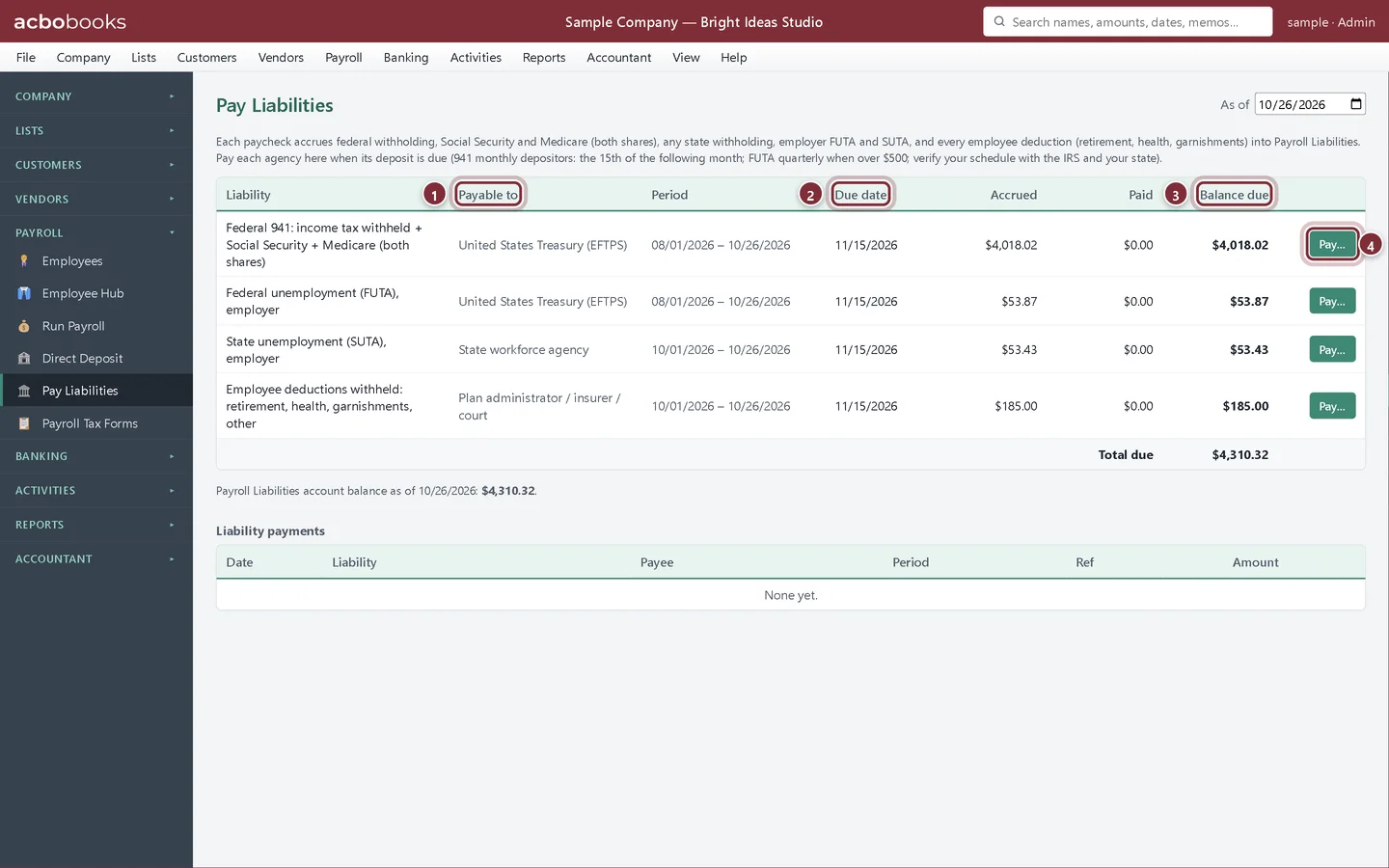
Choose Payroll → Pay Liabilities. Each row is one liability: the federal 941 deposit (income tax withheld plus both shares of Social Security and Medicare), state withholding, FUTA, SUTA, and employee deductions. Change As of to see the position on another date.
- Payable to: the agency or plan.
- Due date: shown in red when it has passed and money is still owed.
- Balance due: accrued by paychecks, less what you have recorded as paid.
- Pay… records a payment for that row.
Record the payment
Step 2: Record a 941 deposit
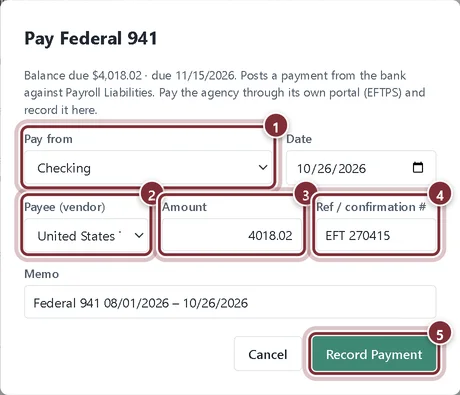
Make the deposit in EFTPS first. Then click Pay… on the Federal 941 row. Check the bank account, choose the payee, confirm the amount and type the EFTPS confirmation number. Click Record Payment.
- Pay from: the bank account the deposit came out of.
- Payee (vendor): add the IRS as a vendor once. If its name contains Treasury, IRS or EFTPS, AcboBooks picks it for you.
- Amount: starts at the balance due. Change it for a partial payment.
- Ref / confirmation #: the EFTPS or state confirmation number.
- Record Payment posts the payment against Payroll Liabilities.
Step 3: Check the payment history
The payment appears under Liability payments and the row's balance due drops. Void puts the amount back as owed if you recorded it by mistake. Below the table, AcboBooks compares the total due with the Payroll Liabilities account balance and warns you if a check or journal entry was posted to that account directly.
- The confirmation number you typed, kept with the payment.

Recap
- You can see each payroll liability with its period and due date.
- You can record a deposit made through EFTPS or a state portal.
- You know why payroll taxes should be paid from Pay Liabilities, not with a plain check.
Questions
Can I pay with Write Checks instead?
Use Pay Liabilities. A plain check to the Payroll Liabilities account lowers the balance but not the rows on this screen, and AcboBooks will show a mismatch.
Where do the 401(k) and health deductions go?
To the Employee deductions row. Record the payment to the plan administrator or insurer there.
Screenshots from AcboBooks 0.2.2 with the built-in sample company. Updated October 25, 2026. Your screens may differ slightly with another version or window size.