
How-to · Payroll and sales tax
How to make a payroll journal entry
A payroll journal entry debits wages expense for gross pay and payroll tax expense for the employer's share, credits a liability for every amount withheld or owed to the government, and credits the bank for net pay. When you remit the withholdings and employer taxes, a second entry clears the liability.

How-to guides / Payroll journal entry
The accounting behind it
The employee earns the gross. Part of it is withheld for income tax and payroll contributions, which you now owe to the government on their behalf. Only the net reaches the employee. The employer also owes its own share of payroll taxes, which is an extra expense.
Every withholding and employer tax is a payroll liability until it is paid. Paying it later debits the liability, not an expense, because the expense was recorded on payday.
If an outside payroll service runs your payroll, you still need this entry in your books, built from the service's payroll register.
| Account | Debit | Credit |
|---|---|---|
| Wages expense | Gross pay | |
| Payroll tax expense | Employer taxes | |
| Payroll liabilities | Withholdings + employer taxes | |
| Bank | Net pay |
| Account | Debit | Credit |
|---|---|---|
| Payroll liabilities | Amount remitted | |
| Bank | Amount remitted |
Worked example: one paycheck in the US and one paycheque in Canada (2026)
US: gross pay $4,000.00. Federal income tax withheld from the W-4 and Publication 15-T is, say, $420.00. Social Security is 6.2% ($248.00) and Medicare 1.45% ($58.00) from the employee, matched by the employer. State taxes, FUTA and SUTA are left out to keep it short. Net pay is $3,274.00 and the employer's taxes are $306.00.
Canada (biweekly, outside Quebec): gross pay $3,000.00. CPP is 5.95% of pay above the per-period share of the $3,500 basic exemption ($3,500 ÷ 26): $170.49, matched by the employer. EI is 1.63% ($48.90), and the employer pays 1.4 times that ($68.46). Income tax from the CRA tables is, say, $350.00. Net pay is $2,430.61 and the employer's cost is $238.95.
| Account | Debit | Credit |
|---|---|---|
| Wages | $4,000.00 | |
| Payroll tax expense | $306.00 | |
| Payroll Liabilities | $1,032.00 | |
| Checking | $3,274.00 |
| Account | Debit | Credit |
|---|---|---|
| Wages | $3,000.00 | |
| Payroll tax expense (CPP, EI) | $238.95 | |
| Payroll Liabilities | $808.34 | |
| Chequing | $2,430.61 |
Common mistakes
- Recording only the net pay as an expense, which understates wages and leaves the liabilities off the books.
- Forgetting the employer's share of Social Security and Medicare, or of CPP and EI.
- Recording the remittance as an expense, which counts the taxes twice.
- Paying employees with a check coded to wages and never recording the withholdings.
In the US and in Canada
United States
Employee and employer each pay 6.2% Social Security on wages up to $184,500 in 2026 and 1.45% Medicare with no cap (SSA). Federal withholding comes from the employee's W-4 and IRS Publication 15-T. The employer also owes FUTA and state unemployment tax, which are expense and liability in the same entry. See payroll tax rates for the full list.
Canada
In 2026 the CPP rate is 5.95% each for employee and employer on earnings up to $74,600 (after the $3,500 basic exemption), plus CPP2 at 4% between $74,600 and $85,000. EI is 1.63% for the employee on insurable earnings up to $68,900, and the employer pays 1.4 times the employee premium. Quebec uses QPP, QPIP and a lower EI rate. See the Canadian payroll calculator.
In AcboBooks
Run Payroll in AcboBooks 0.2.1 posts the payday entry for you; Pay Liabilities posts the remittance.
- Run payroll. Go to Payroll → Run Payroll, choose the employee and pay details, check the withholdings and click Create Paycheck (Create Paycheque in the Canadian edition).
- What it posts. Gross pay plus the employer's taxes go to Payroll Expenses, everything withheld or owed goes to Payroll Liabilities, and net pay comes out of the bank.
- Remit. Go to Payroll → Pay Liabilities, click Pay… on the row, choose Pay from, the Date, the Payee (vendor), the Amount and a Ref / confirmation #, and click Record Payment. That debits Payroll Liabilities.
- Outside payroll service. If a service runs payroll, enter its register totals with Activities → Make Journal Entry instead, using the lines above, and click Make recurring if the amounts repeat.
Run Payroll posts the employer's taxes into the same Payroll Expenses account as wages. If you want them in a separate account on your P&L, ask your accountant whether a reclassifying entry at month-end is worth it.
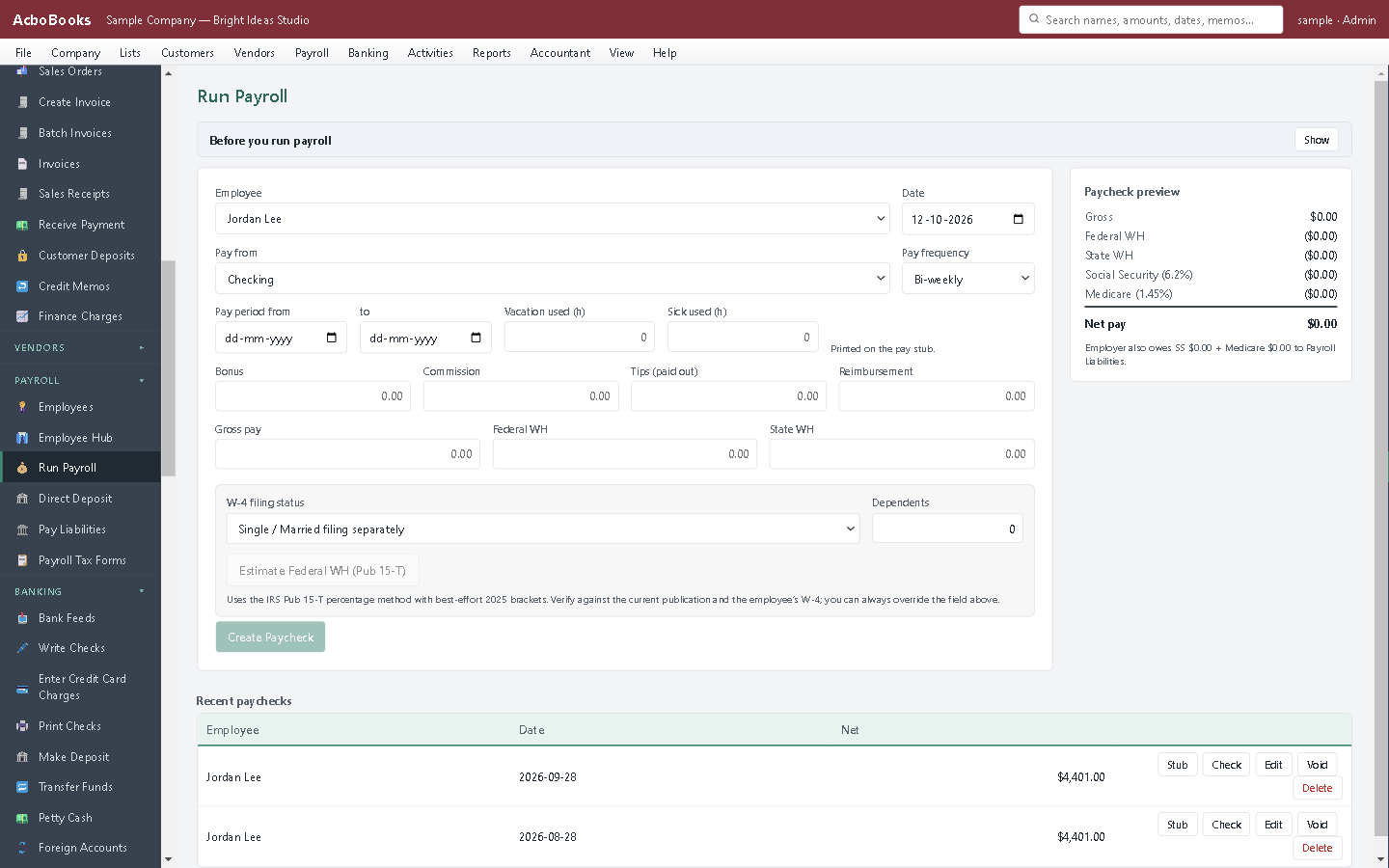
Menu names are from AcboBooks 0.2.1. Not using it yet? Try it free for 15 days, with the sample company to practise on.
Questions
What accounts are in a payroll journal entry?
Wages expense, payroll tax expense, one or more payroll liability accounts, and the bank account the net pay comes from.
Is the employee's withholding an expense?
No. It is part of gross wages, already in wages expense. The withheld amount is a liability until you remit it.
How do I record payroll from a payroll service?
Make a journal entry from the service's payroll register each pay period: gross wages and employer taxes as debits, liabilities and net pay as credits. If the service also remits the taxes, record those payments against the liability.
Related how-to guides
- How to record an accrued expense
- How to reverse a journal entry
- How to record a GST/HST input tax credit
Terms used here
- How to run payroll in the US
- How to run payroll in Canada
- US paycheck calculator
- Employee cost calculator
- Payroll in AcboBooks
Sources
- SSA: contribution and benefit base, 2026
- CRA: CPP contribution rates, maximums and exemptions
- CRA: EI premium rates and maximums
Updated October 25, 2026. General bookkeeping information, not tax, legal or accounting advice. Rules differ by state and province and change over time; check with the IRS, the CRA or your accountant for your own situation.
Get started
Entries like this, done in the right screen.
AcboBooks is desktop accounting for US and Canadian small businesses, bought once and kept on your own PC.
No card. No account. Nothing to cancel.